
دائمًا وأبدًا هناك أفضلية لمستخدمي أجهزة الكمبيوتر على مُستخدمي أجهزة الكونسول (PS4 و Xbox One) وذلك بسبب أفضلية التحكم بالألعاب عن طريق الكيبورد و الماوس، وذلك بالنسبة لألعاب التصويب والتي تتطلب سرعة ودقة في الحركة وإطلاق النيران لقتل الخصوم، ولكن دائمًا يوجد حل، فبإمكان مستخدمي منصات PS4 و Xobx One ممارسة ألعاب التصويب عن طريق لوحة المفاتيح و الفأرة، وإليك الطرق الممكنة لفعل ذلك.
طريقة إضافة وإعداد لوحة المفاتيح والماوس على PS4
هناك طريقتان لتشغيل الماوس و الكيبورد على البلايستيشن 4 و PS4 Pro، الأولى مخُصصة للكيبورد و الماوس الوايرليس، بينما الأخرى للأجهزة السلكية.
الطريقة للكيبورد و الماوس السلكي:
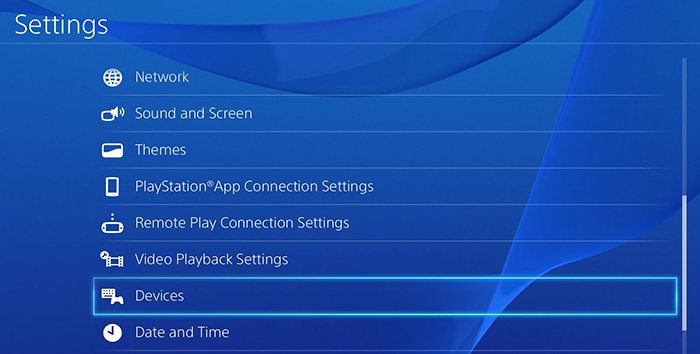
قم بتوصيل لوحة المفاتيح والفأرة بجهاز PS4 عن طريق منفذ USB المتواجد به.بعد مرور بضع ثواني من المُفترض أن يتم التعرف على اللوحة والفأرة.ولضبط الإعدادات الخاصة بهم، قم بالتوجه إلى إعدادات Settings في البلايستيشن 4 ثم توجه إلى Devices.وستجد أمامك اللوحة و الفأرة قم بإختيار أحدهم لتعديل الإعدادات إن أردت.
الطريقة للكيبورد و الماوس الوايرليس:
الأجهزة اللاسلكية مُرفق معها فلاشة USB صغيرة يتم توصيلها بجهاز الـ Sony PS4 ليتم التواصل لاسلكيًا، فقم بتوصيل الفلاشتين بمنفذي الـ USB بالجهاز.قم بالإنتظار لمدة 30 ثانية بعد التوصيل لحين التعرف على الأجهزة.لضبط الإعدادات الخاصة بهم قم بالتوجه إلى Settings ثم Devices وستجد أمامك اللوحة و الفأرة قد تم التعرف عليهم.

ملحوظة: إن كنت تستخدم كيبورد يتصل عن طريق البلوتوث وليس فلاشة USBB، قم بالتوجه إلى Settings ثم Devices ثم إختر Bluetooth Devices وستجد اللوحة أمامك إضغط عليها ليتم الربط.
وأيضًا هناك ألعاب لا تدعم التحكم إلا عن طريق ذراع البلايستيشن فقط، ولحل تلك المشكلة قم بالاستعانة بقطعة XIM Apex التي سيتم ذكرها في الجزء الخاص بالإكس بوكس.
طريقة إضافة وإعداد لوحة المفاتيح والماوس على Xbox One
في تلك النقطة يتفوق PS4 على Xbox One حيث يدعم إضافة لوحة المفاتيح والفأرة بشكل إفتراضي داخل النظام، بينما إكس بوكس ما زال غير داعم لتلك الميزة حتى الآن، لكن هناك طريقة للإلتفاف حول ذلك وربط اللوحة والفأرة بالجهاز.
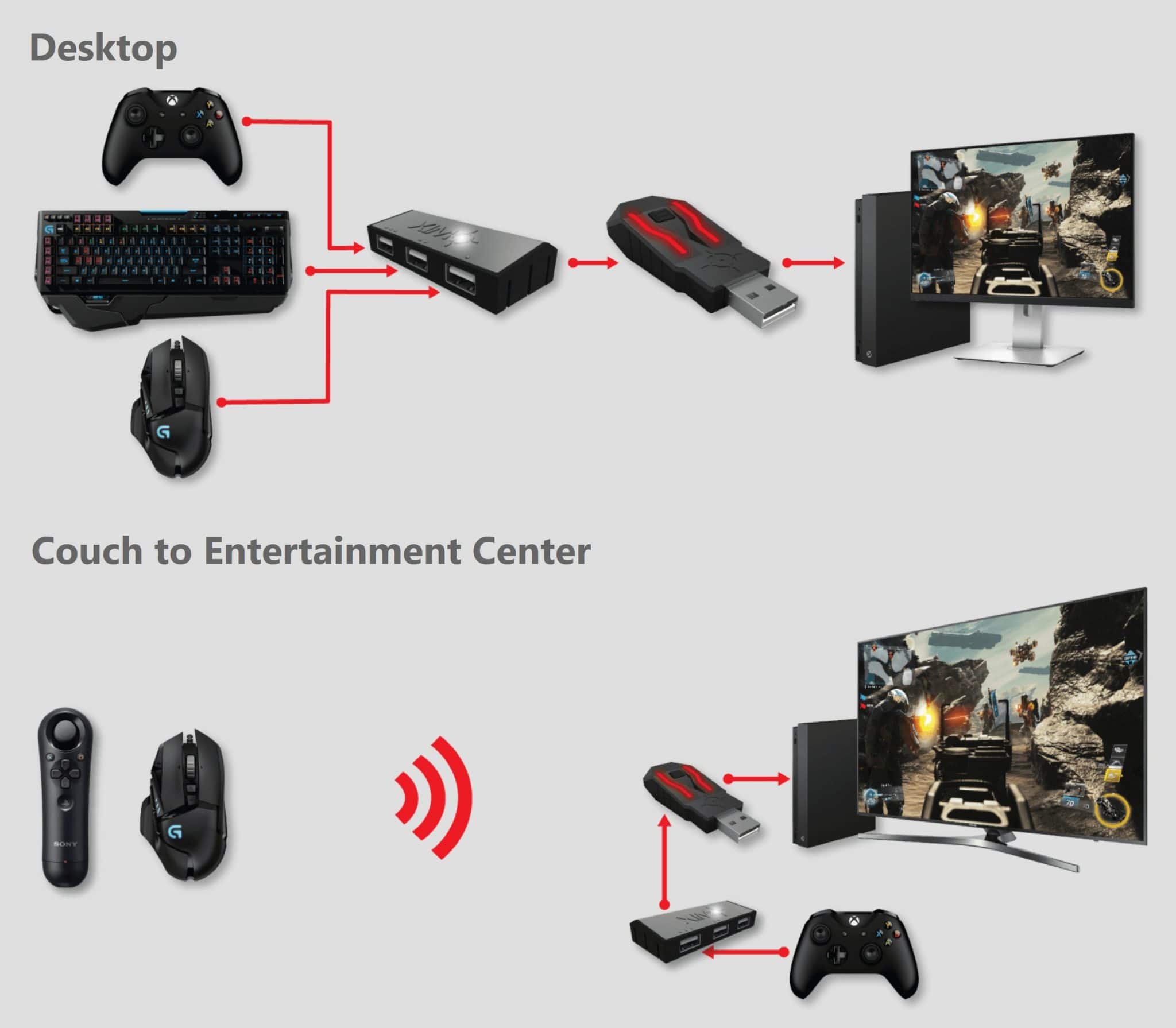
وتلك الطريقة تعتمد على قطعة باسم XIM Apex، وهي عبارة عن فلاشة يتم التحكم بها عن طريق البلوتوث من خلال تطبيق على هواتف الأندرويد و Ios، ويتم إيصالها بمنفذ USB في الإكس بوكس ثم توصيل الماوس و الكيبورد بها سواء لاسلكيًا أو سلكيًا.
ولكن يوجد بها منفذ USB واحد فقط، لذلك ستجد USB Hub مرفق بالقطعة يحتوي على 3 منافذ أخرى لتوصيل الماوس و الكيبورد وجهاز آخر كذراع PS4.
وطريقة إعداد قطعة XIM Apex، تحتاج إلى توصيل القطعة بالحاسوب وتعديل الإعدادات الخاصة بها، ثم ربطها بجهاز Xbox One، بعد ذلك قم بربطها بالتطبيق الخاص على الهاتف من خلال البلوتوث للتحكم بها، وبالطبع قم بتوصيل اللوحة و الفأرة بها.
ومن خلال ذلك التطبيق ستجد أكثر من 350 لعبة من ضمنها لعبة فورت نايت، والتي يمكنك تعديل إعدادات التحكم كما تريد أي تعديل أزرار الكيبورد و حساسية الماوس من خلال التطبيق.
و الجدير بالذكر أنّ قطعة XIM Apex تدعم جهاز الـ PS4 أيضًا (للألعاب التي لا تدعم التحكم عن طريق الماوس و الكيبورد)، وبإمكانك توصيل ذراع تحكم الـ PS4 بجهاز Xbox one عن طريقها.
هل جميع الألعاب على PS4 و Xbox One تدعم التحكم عن طريق الكيبورد و الماوس؟
للأسف ليست جميع الألعاب تدعم التحكم من خلال لوحة المفاتيح و الفأرة بشكل إفتراضي، أي لا يوجد إمكانية لتعديل إعدادات اللوحة و الفأرة من داخل اللعبة، وهناك عدد محدود من الألعاب يدعم ذلك.
ولحل تلك المشكلة يجب الاستعانة بقطعة XIM Apex التي سبق ذكرها وهي تدعم جهازي بلايستيشن 4 و إكس بوكس ون، ومن خلالها يمكنك الاستمتاع بممارسة أكثر من 350 لعبة عن طريق الفأرة ولوحة المفاتيح.
There is always a preference for PC users on PS4 and Xbox One because of the superiority of game control via the keyboard and the mouse for shooting games that require speed and accuracy in motion and fire to kill opponents, but there is always a solution. PS4 and Xobx One Practice Shooting games by keyboard and mouse, here are the possible ways to do it.
How to add and set up keyboard and mouse on PS4
There are two ways to run the mouse and the keyboard on the Playstation 4 and PS4 Pro, the first one is for the keyboard and the wireless mouse, while the other is for wired devices.
The method for cordless and wired mouse:

Connect the keyboard and mouse to the PS4 device via its USB port. After a few seconds the motherboard and the mouse are supposed to be recognized. To adjust their settings, go to the Settings settings on the PlayStation 4 and go to Devices. Choose one to modify the settings if you want.
The way to the keyboard and the mouse The wireless:
Wireless devices come with a mini USB stick connected to the Sony PS4 to communicate wirelessly, connect the flash to the USB ports on the device. Wait for 30 seconds after connecting until you know the devices. To adjust their settings, go to Settings and Devices and you will find the panel The mouse has been identified.

Note: If you are using a keyboard that is connected via Bluetooth and not a USBB bus, go to Settings and Devices then select Bluetooth Devices and you will find the panel in front of you to click on it to connect.
There are also games that do not support the control only by the arm of the Playstation only, and to solve that problem, use the XIM Apex segment that will be mentioned in the section of the Xbox.
How to add and set up your keyboard and mouse on an Xbox One
At that point, PS4 outperforms Xbox One, which supports the virtual addition of the keyboard and mouse within the system, while Xbox is still not supportive of that feature so far, but there is a way to get around it and connect the tablet and mouse to the device.

This method is based on a piece called XIM Apex, which is a Bluetooth-controlled blade through an application on Android and Ios phones, delivered to a USB port in the Xbox and then connected to the mouse and keyboard both wirelessly and wired.
But there is only one USB port, so you'll find a USB hub attached to a piece containing 3 other ports to connect the mouse and keyboard and another device as a PS4 arm.
And how to set up the XIM Apex segment, you need to connect the piece to the computer and modify its settings, then connect it to the Xbox One, then connect it to the application on the phone through Bluetooth to control them, and of course connect the board and the mouse.
Through this application you will find more than 350 games including Fortnight, which you can modify the control settings as you want to modify the keyboard buttons and the sensitivity of the mouse through the application.
The XIM Apex also supports the PS4 (for games that do not support mouse and keyboard control), and you can connect the PS4 controller to an Xbox one.
Do all the games on the PS4 and Xbox One support keyboard and mouse control?
Unfortunately, not all games support keyboard and mouse control by default, that is, there is no possibility to modify the board and mouse settings from within the game, and there are a limited number of games supports it.
To solve that problem, use the previously mentioned XIM Apex that supports the PlayStation 4 and the Xbox One, and you can enjoy more than 350 games with your mouse and keyboard.


ليست هناك تعليقات:
إرسال تعليق